GuideESG performance management: ESG data collection & automation
How to move ESG data collection from emailed spreadsheets to automated workflows – with clean data structures, validation rules, AI extraction and an audit trail.
easy4pro editorial team·Last reviewed: ·8 min read
Key takeaways
Most ESG data already exists – in energy invoices, payroll, accounting, waste reports and spreadsheets. The work is in collecting it, not creating it.
Structure comes before automation: one value per row, with site, period, unit, source and owner. Automation multiplies whatever is there, including errors.
Automate the frequent, regular data flows first – usually energy – and leave rare special cases manual.
Validation rules, reminders and a four-eyes approval keep automated data correct and on time. AI extraction from PDFs speeds things up but always needs a human check.
Assurance providers ask how each figure came about. The revised ESRS ask you to describe your methods and the main features of your internal control over sustainability reporting – an automated, documented process makes both easier.
Most of the time in ESG reporting is not spent on analysis but on collecting: emails to sites, spreadsheets with different columns, follow-up questions about units and periods. Much of that can be automated – if the foundation is right.
This guide answers the questions teams ask when the spreadsheets stop scaling: Where does ESG data actually sit? What has to be in place before you automate? Which steps can be automated safely, and which need a person? How do you keep automated data correct? And how does all of this help with assurance under the revised ESRS?
Example (fictional)
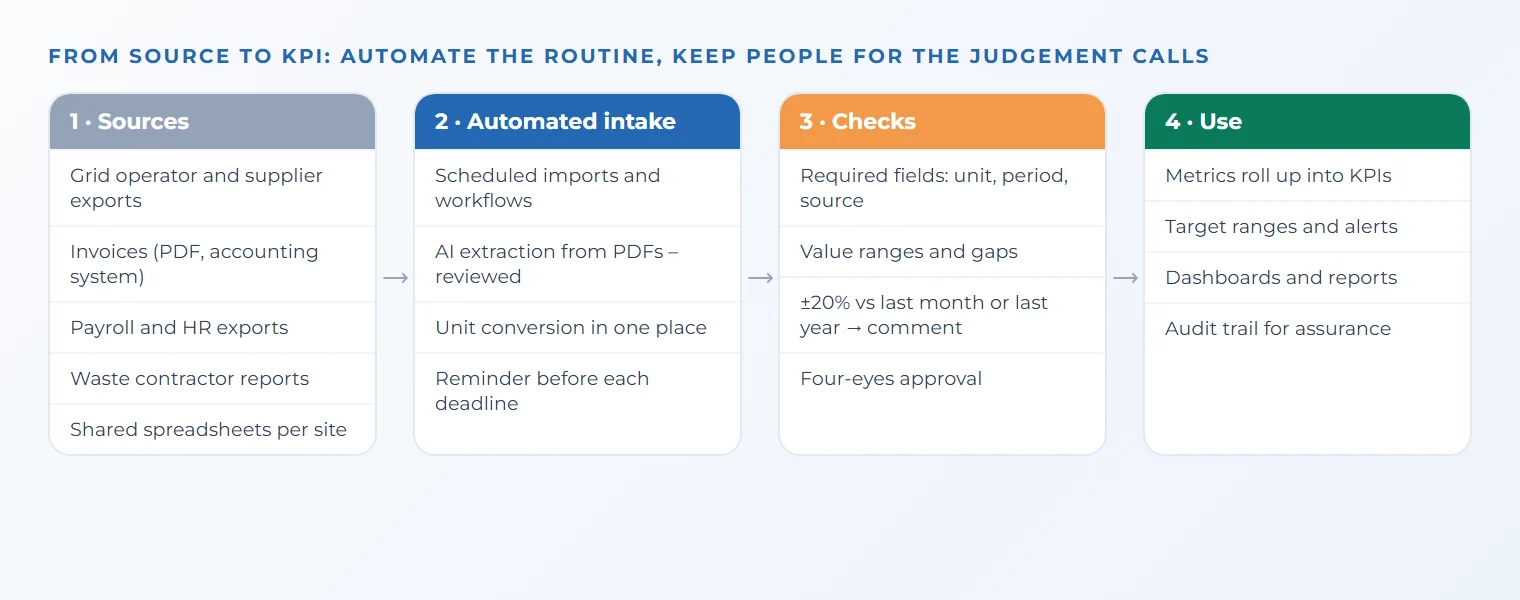
A food group with six sites collects 40 metrics a month – energy, water, waste, headcount, accidents. Each site sends its own Excel file by email; merging them takes two working days, and every month at least one file uses MWh instead of kWh. The team switches to one shared structure with fixed columns, automated imports from the grid operator, supplier invoices and payroll, a reminder three days before the deadline and an alert for deviations above 20%. Monthly consolidation now takes two hours – spent on checking the flagged values, not on copying.
Where ESG data sits today
Data
Typical source
Typical format
Electricity, gas, heat
Grid operator portals, supplier invoices
CSV export, PDF invoice
Fuel
Fuel card statements, delivery notes
CSV, PDF
Water
Utility bills, own meters
PDF, meter readings
Waste
Monthly or annual reports from waste contractors
PDF, spreadsheet
Employees, accidents, training
Payroll, HR and health and safety systems
Export, report
Business travel
Travel agency, expense system
CSV export
Purchasing (for Scope 3)
Accounting, ERP
Export by supplier and account
What this means for you: list your sources before you buy or build anything. In most companies, five or six sources cover 80% of the monthly data.
Structure first, then automate
Automation multiplies whatever is there – including inconsistencies. Bring order to the data first:
One value per row, with fixed columns: site, metric, period, value, unit, source, entered by.
Consistent names: “electricity” is called the same everywhere, not “power” in one file and “energy – electricity” in another.
Fixed units: decide once whether you enter kWh or MWh and convert in one place only.
Clear periods: calendar month, financial year or invoice period – and a rule for invoices that span two months.
One store for evidence that every value points to: invoice, export, meter photo.
This structure is also the basis for auditable data collection: each datapoint with an owner, a source, a method and evidence.
Five levels of automation
Automation is not all or nothing. Most companies move through the same levels, one data flow at a time:
Level
What it looks like
Typical effort per month
1 · Emailed spreadsheets
Every site sends its own file, in its own layout
Days of merging and follow-up questions
2 · One shared structure
A common template or shared sheet with fixed columns, units and periods
Hours of checking, little copying
3 · Scheduled imports
Exports from portals, accounting and HR are imported on a schedule; reminders go out automatically
Checking flagged values only
4 · Workflows with checks
Imports, AI extraction, validation rules, approvals and alerts run as one workflow
Exceptions and approvals
5 · System integration
Data flows directly from meters, ERP and HR systems
Monitoring the integration
Level 4 is the sweet spot for most mid-sized companies: almost all routine work is automated, while estimates, explanations and approvals stay with people. Level 5 pays off where volumes are large and systems are stable – it is not a prerequisite for good data.
What this means for you: do not wait for a full system integration. Moving the biggest data flow from level 1 to level 3 or 4 usually saves more time than anything else you can do this year.
What can be automated – and what should stay manual
Step
Automate?
How
Importing regular data
Yes
Scheduled imports from portals, shared spreadsheets, accounting and HR exports
Reading invoices and reports
Partly
AI extraction from PDFs, with a person approving the extracted values
Reminders and escalation
Yes
Reminder before the deadline, alert when a value is missing
Plausibility checks
Yes
Value ranges, gaps, comparison with last month and last year
Unit conversion and calculations
Yes
Central factors, applied the same way for all sites
Judgements and estimates
No
Estimation methods, materiality, explanations of outliers stay with people
Approval
No
Four-eyes approval before values count
From source to KPI: intake, conversion and checks run automatically; estimates, explanations and approval stay with people.
AI extraction, used carefully. Reading kWh, period and site from a PDF invoice is a good job for AI – it saves time on dozens of documents a month. Treat every extracted value as a draft: a person checks it against the source before it goes into a KPI or a report. Record which values were extracted and who approved them.
Validation rules that work
Required fields. No value is accepted without site, period, unit and source.
Value ranges. Negative consumption, tenfold values and impossible dates are rejected or flagged.
Gaps. A missing month triggers an alert instead of being stored as zero.
Comparison with last month and last year. Deviations above a set threshold, for example 20%, need a comment before approval.
Four-eyes approval. Automatically collected does not mean automatically checked; the data owner approves.
Audit log. Every change is traceable to a time and a person, with the previous value kept.
Data protection and access
Workforce data – headcount, accidents, pay – is personal data or close to it. Automate it at the level you report: aggregated per site and month, not per person. Restrict access by role, so that sites see their own data and only a few people see pay data. Where a software provider processes personal data on your behalf, the GDPR requires a contract governing that processing (Article 28).
Why automation helps with assurance
Companies in the CSRD scope have their sustainability statement assured with limited assurance; Omnibus I made that the permanent level. Assurance providers test whether reported figures can be traced to a source and a method. Under the revised ESRS, you describe the main features of your internal control and risk management over sustainability reporting (ESRS 2, GOV-4) and, for each metric, the methodology, significant assumptions and limitations (ESRS 2, GDR-M). Where you estimate, ESRS 1 allows reasonable and supportable information available without undue cost or effort – but the estimate needs a documented method.
An automated process with validation rules, approvals and an audit log is that internal control, written down and working. The guide on assurance of the sustainability statement shows what auditors look for.
What this means for you: document each workflow – source, schedule, checks, approver – once. That description is reusable evidence for every assurance engagement.
Step by step to automated ESG data
Pick one data flow. One that recurs every month and costs the most manual work today – usually energy.
Fix the structure. Columns, names, units, periods and evidence store for that flow.
Automate the intake. Import or extraction, plus a reminder before the deadline.
Switch on the checks. Required fields, ranges, gaps, deviations and approval.
Run it for three months. Fix what breaks, then document the workflow.
Repeat for the next flow. Waste, water, workforce, purchasing – the same pattern each time. Step by step this builds the data foundation for steering KPIs all year.
Common mistakes
Automating chaos: importing inconsistent spreadsheets only speeds up the inconsistency.
Silent zeros: a missing value stored as zero hides the gap.
Unchecked AI extraction: extracted values go into the report without anyone comparing them to the invoice.
Converting at the source and discarding the original: later checks become impossible.
Too much at once: ten data flows started together, none finished.
No owner: a workflow without a person responsible stops working quietly.
How ECOMON helps you automate ESG data collection
ECOMON combines a structured KPI model with no-code automation.
A fixed structure: metrics (one measured value each), metric groups and KPIs, organised in folders by site, topic or framework.
No-code workflow automation: connect ECOMON to tools such as Google Workspace, Slack and Xero to import data, sync it and send notifications – for example, utility invoices from Xero into the right energy metric.
AI data extraction and insights: extract values from your files with AI and get AI-powered analyses of KPI and OKR performance; people review the results.
Values with evidence: each value carries its date, a comment and attached files.
Notifications, action history and restore: alerts for missing or unusual values, and a full record of changes that can be restored – the audit trail assurance providers ask for.
Where should we start?
With the data flow that recurs most often and costs the most manual work – usually energy. Structure it, automate it, check it for three months, then move on.
Can AI read our invoices reliably?
It extracts most values correctly and saves a lot of time, but not all of them. Treat extracted values as drafts and have a person approve them against the source.
Do we need an ERP integration?
Not to start. Scheduled exports from existing systems and shared spreadsheets cover most needs; deeper integrations can follow where the volume justifies them.
How does automation help with the audit?
Assurance providers ask how each figure came about. Documented workflows with checks, approvals and an audit log answer that question and support your description of internal controls under ESRS 2.
What about personal data?
Collect workforce data aggregated at the level you report, restrict access by role, and agree the processing with your software provider in a contract.
How to import electricity, gas, heat and fuel data automatically – from grid operator portals and invoices to sub-meters – and turn it into ESRS-ready energy figures.
How to set a credible climate target – boundary, base year, absolute or intensity, ambition – and track it monthly so you notice deviations while you can still act.
Why ESG metrics should be steered throughout the year, and how to set up the KPI structure, definitions, target ranges, benchmarks, owners and review rhythm.